


Inner-loop networking overview
One of the advantages of developing with Aspire is that it enables you to develop, test, and debug cloud-native apps locally. Inner-loop networking is a key aspect of Aspire that allows your apps to communicate with each other in your development environment. In this article, you learn how Aspire handles various networking scenarios with proxies, endpoints, endpoint configurations, and container networking.
The proxy mental model
Section titled “The proxy mental model”Think of Aspire’s networking like a hotel front desk:
- Clients (your code calling APIs) always talk to the front desk (proxy) at a known, stable address
- The front desk routes requests to the actual room (your service) wherever it happens to be
- If you have multiple rooms (replicas), the front desk handles which one to connect to
This design solves several problems:
| Problem | How the proxy helps |
|---|---|
| Port conflicts | Two services can’t both use port 5000—but the proxy can allocate different ports for each |
| Replicas | Multiple instances of a service need load balancing—the proxy handles this automatically |
| Service restarts | When a service restarts on a new port, the proxy’s address stays the same |
flowchart LR
    Client["Your Code"]
    Proxy["Proxy :5000"]
    App1["Service :52847"]
    App2["Service :52848"]

    Client --> Proxy
    Proxy --> App1
    Proxy --> App2
Networking in the inner loop
Section titled “Networking in the inner loop”The inner loop is the process of developing and testing your app locally before deploying it to a target environment. Aspire provides several tools and features to simplify and enhance the networking experience in the inner loop, such as:
- Endpoints/Endpoint configurations: Endpoints are the connections between your app and the services it depends on, such as databases, message queues, or APIs. Endpoints provide information such as the service name, host port, scheme, and environment variable. Aspire can create endpoints automatically from resource configuration, and you can also add them explicitly by calling
WithEndpoint. - Proxies: Aspire automatically launches a proxy for each service binding you add to your app, and assigns a port for the proxy to listen on. The proxy then forwards the requests to the port that your app listens on, which might be different from the proxy port. This way, you can avoid port conflicts and access your app and services using consistent and predictable URLs.
- Container networks: Aspire creates and manages dedicated networks for container resources so containers can discover and communicate with each other during local development.
How endpoints work
Section titled “How endpoints work”A service binding in Aspire involves two integrations: a service representing an external resource your app requires (for example, a database, message queue, or API), and a binding that establishes a connection between your app and the service and provides necessary information.
Aspire can create service bindings automatically from resource configuration, and you can create additional bindings explicitly by using WithEndpoint.
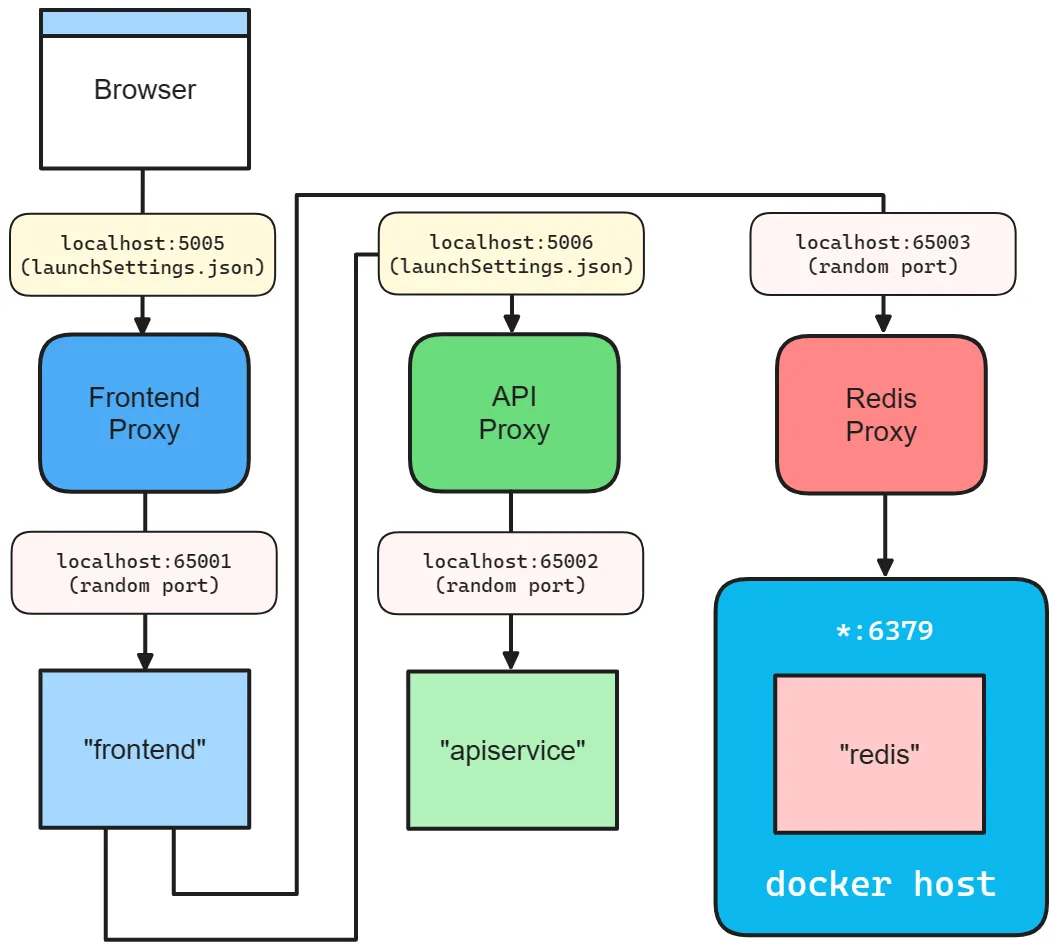
Upon creating a binding, whether implicit or explicit, Aspire launches a lightweight reverse proxy on a specified port, handling routing and load balancing for requests from your app to the service. The proxy is an Aspire implementation detail, requiring no configuration or management concern.
To help visualize how endpoints work, consider the Aspire starter templates inner-loop networking diagram:
How container networks are managed
Section titled “How container networks are managed”When you add one or more container resources, Aspire creates a dedicated container bridge network to enable service discovery between containers. This bridge network is a virtual network that lets containers communicate with each other and provides a DNS server for container-to-container service discovery using DNS names.
The network’s lifetime depends on the container resources:
- If all containers have a session lifetime, the network is also session-based and is cleaned up when the AppHost process ends.
- If any container has a persistent lifetime, the network is persistent and remains running after the AppHost process terminates. Aspire reuses this network on subsequent runs, allowing persistent containers to keep communicating even when the AppHost isn’t running.
For more information on container lifetimes, see Persistent container lifetimes.
Here are the naming conventions for container networks:
- Session networks:
aspire-session-network-<unique-id>-<app-host-name> - Persistent networks:
aspire-persistent-network-<project-hash>-<app-host-name>
Each AppHost instance gets its own network resources. The only differences are the network’s lifetime and name; service discovery works the same way for both.
Containers register themselves on the network using their resource name. Aspire uses this name for service discovery between containers. For example, a pgadmin container can connect to a database resource named postgres using postgres:5432.
Container network aliases
Section titled “Container network aliases”By default, containers are accessible on the container network using their resource name as a DNS alias. For example, a container added with AddContainer("mydb", ...) is reachable at mydb:5432 from other containers.
Sometimes you need additional aliases—for example, when a third-party tool expects a specific hostname, or when migrating from an existing Docker Compose setup. Use WithContainerNetworkAlias to add custom DNS names:
var redis = builder.AddRedis("cache") .WithContainerNetworkAlias("redis-primary") .WithContainerNetworkAlias("session-store");Now other containers can connect to Redis using any of these names:
cache:6379(default resource name)redis-primary:6379(custom alias)session-store:6379(custom alias)
Some endpoint behavior depends on the resource type. Keep those details with the docs for that resource type instead of duplicating them in this overview.
For .NET-specific endpoint behavior, see C# launch profiles and Project resources.
Ports and proxies
Section titled “Ports and proxies”When defining a service binding, the host port is always given to the proxy that sits in front of the service. This allows single or multiple replicas of a service to behave similarly. Additionally, all resource dependencies that use the WithReference API rely of the proxy endpoint from the environment variable.
The same proxy pattern applies when a service runs multiple replicas. The browser still connects to one stable host port while the proxy fans out traffic to whichever replica is available:
The preceding code results in the following networking diagram:
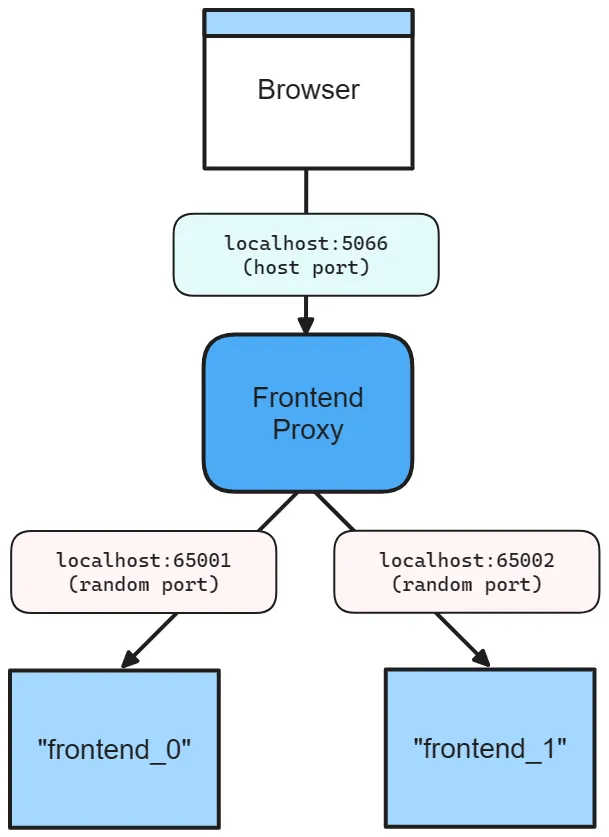
The preceding diagram depicts the following:
- A web browser as an entry point to the app.
- A host port of 5066.
- The frontend proxy sitting between the web browser and the frontend service replicas, listening on port 5066.
- The
frontend_0frontend service replica listening on the randomly assigned port 65001. - The
frontend_1frontend service replica listening on the randomly assigned port 65002.
For a JavaScript app that reads its listener port from an environment variable, expose a stable host port like this:
builder.AddJavaScriptApp("frontend", "./frontend") .WithHttpEndpoint(port: 5066, env: "PORT");There are two ports defined:
- A host port of 5066.
- A random proxy port that the underlying service will be bound to.
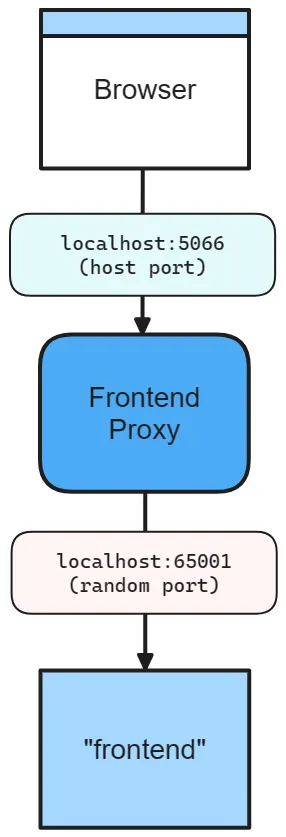
The preceding diagram depicts the following:
- A web browser as an entry point to the app.
- A host port of 5066.
- The frontend proxy sitting between the web browser and the frontend service, listening on port 5066.
- The frontend service listening on random port of 65001.
The underlying service still listens on its own port, and Aspire makes that allocated port available to the app through the PORT environment variable.
Omit the host port
Section titled “Omit the host port”When you omit the host port, Aspire generates a random port for both host and service port. This is useful when you want to avoid port conflicts and don’t care about the host or service port. Consider the following code:
builder.AddJavaScriptApp("frontend", "./frontend") .WithHttpEndpoint(env: "PORT");In this scenario, both the host and service ports are random, as shown in the following diagram:
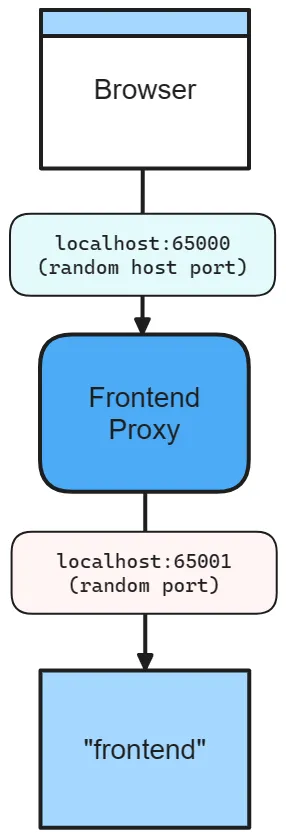
The preceding diagram depicts the following:
- A web browser as an entry point to the app.
- A random host port of 65000.
- The frontend proxy sitting between the web browser and the frontend service, listening on port 65000.
- The frontend service listening on a random port of 65001.
Container ports
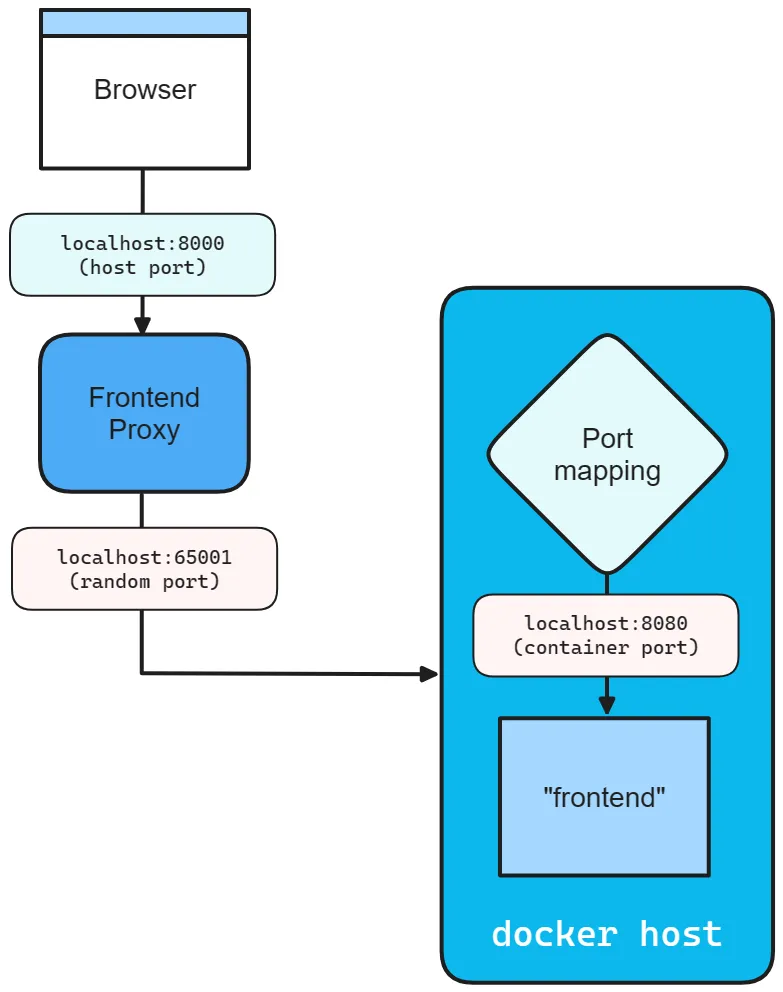
Section titled “Container ports”When you add a container resource, Aspire automatically assigns a random port to the container. To specify a container port, configure the container resource with the desired port:
builder.AddContainer("frontend", "mcr.microsoft.com/dotnet/samples", "aspnetapp") .WithHttpEndpoint(port: 8000, targetPort: 8080);The preceding code:
- Creates a container resource named
frontend, from themcr.microsoft.com/dotnet/samples:aspnetappimage. - Exposes an
httpendpoint by binding the host to port 8000 and mapping it to the container’s port 8080.
Consider the following diagram:
Endpoint extension methods
Section titled “Endpoint extension methods”Any resource that implements the IResourceWithEndpoints interface can use the WithEndpoint extension methods. There are several overloads of this extension, allowing you to specify the scheme, container port, host port, environment variable name, and whether the endpoint is proxied.
There’s also an overload that allows you to specify a delegate to configure the endpoint. This is useful when you need to configure the endpoint based on the environment or other factors. Consider the following code:
builder.AddContainer("apiService", "nginx") .WithEndpoint( endpointName: "admin", callback: static endpoint => { endpoint.Port = 17003; endpoint.UriScheme = "http"; endpoint.Transport = "http"; });The preceding code provides a callback delegate to configure the endpoint. The endpoint is named admin and configured to use the http scheme and transport, as well as the 17003 host port. Consumers can reference this endpoint by name with a URI such as http://_admin.apiservice. The _ sentinel indicates that the admin segment is the endpoint name belonging to the apiservice service. For more information, see Service discovery.
Additional considerations
Section titled “Additional considerations”When calling the WithEndpoint extension method, the callback overload exposes the raw EndpointAnnotation, which allows the consumer to customize many aspects of the endpoint.
The AllocatedEndpoint property allows you to get or set the endpoint for a service. The IsExternal and IsProxied properties determine how the endpoint is managed and exposed: IsExternal decides if it should be publicly accessible, while IsProxied ensures DCP manages it, allowing for internal port differences and replication.
The Name property identifies the service, whereas the Port and TargetPort properties specify the desired and listening ports, respectively.
For network communication, the Protocol property supports TCP and UDP, with potential for more in the future, and the Transport property indicates the transport protocol (HTTP, HTTP2, HTTP3). Lastly, if the service is URI-addressable, the UriScheme property provides the URI scheme for constructing the service URI.
For more information, see the available properties of the EndpointAnnotation properties.
For project-resource-specific endpoint filtering, see Project resources.
Troubleshooting
Section titled “Troubleshooting”Port already in use
Section titled “Port already in use”Symptom: Error message like Address already in use or Failed to bind to port
Common causes:
- Another instance of your app is still running
- A previous Aspire session didn’t shut down cleanly
- Another application is using the same port
Solutions:
- Stop any running Aspire sessions with
Ctrl+Cor close the dashboard - Check for processes using the port:
netstat -ano | findstr :5000(Windows) orlsof -i :5000(macOS/Linux) - Let Aspire assign random ports by removing explicit port numbers from
WithEndpoint
Can’t connect to container
Section titled “Can’t connect to container”Symptom: Timeouts or connection refused when connecting to a container resource
Common causes:
- The container hasn’t finished starting
- Missing
WaitFor()dependency - Container is on the container network but you’re connecting from the host
Solutions:
- Add
.WaitFor(container)to ensure the container is ready before dependent services start - Add
.WithHttpHealthCheck()or.WithHealthCheck()to the container resource - Ensure host services use the exposed port (not the container’s internal port):
// Container exposes port 5432 to hostvar db = builder.AddPostgres("db");
// Host service connects via exposed port (handled by WithReference)var api = builder.AddJavaScriptApp("api", "./api")    .WithHttpEndpoint(env: "PORT")    .WithReference(db); // ✅ Correct - uses exposed port
Service not discoverable
Section titled “Service not discoverable”Symptom: Service discovery fails with “service not found” or DNS resolution errors
Solutions:
- Verify
WithReference()is set up between producer and consumer - Check the endpoint name in the URI matches exactly (case-sensitive)
- Review service discovery troubleshooting