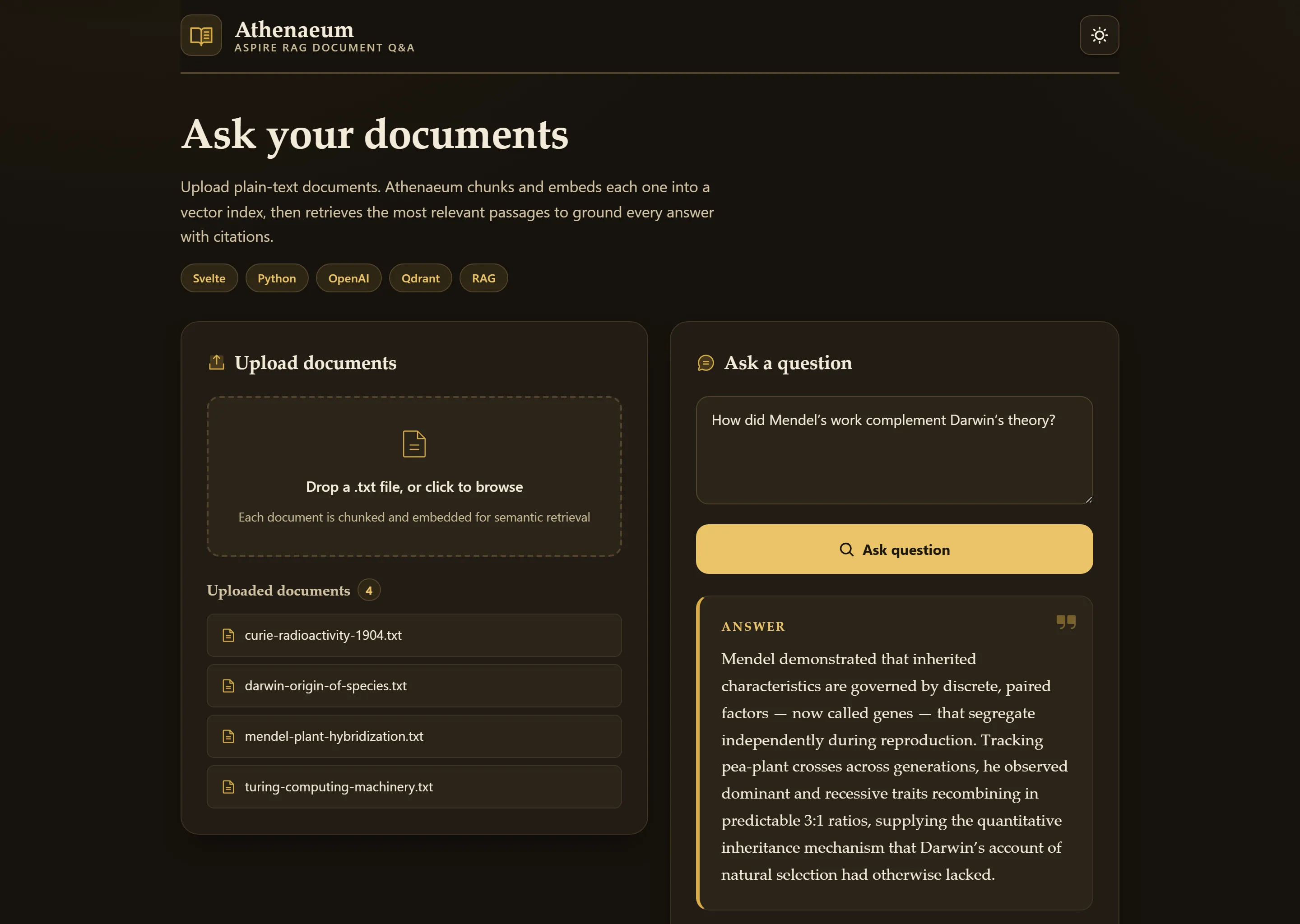
Clone, run, and explore this sample
The uploaded document list, answer, and cited passages shown above are illustrative — an OpenAI API key is required for live embeddings and answers. The empty-document and upload error states are captured against the real backend.
The entry point that composes every resource and dependency in this sample's distributed application.
import { createBuilder } from "./.aspire/modules/aspire.mjs";
const builder = await createBuilder();
const openAiApiKey = await builder.addParameter("openai-api-key", { secret: true });
const qdrant = await builder.addQdrant("qdrant");
await builder.addOpenAI("openai")    .withApiKey(openAiApiKey);
const api = await builder.addUvicornApp("api", "./api", "main:app")    .withUv()    .withHttpHealthCheck({ path: "/health" })    .waitFor(qdrant)    .withReference(qdrant)    .withEnvironment("OPENAI_APIKEY", openAiApiKey)    .withExternalHttpEndpoints();
const frontend = await builder.addViteApp("frontend", "./frontend")    .withReference(api)    .withUrl("", { displayText: "RAG UI" });
await api.publishWithContainerFiles(frontend, "public");
await builder.build().run();
The uploaded document list, answer, and cited passages shown above are illustrative — an OpenAI API key is required for live embeddings and answers. The empty-document and upload error states are captured against the real backend.
Upload documents and ask questions using Retrieval Augmented Generation with vector search.
Architecture
Section titled ArchitectureRun Mode:
flowchart LR
    User --> Svelte[Vite Dev Server<br/>HMR enabled]
    Svelte -->|Proxy /api| API[FastAPI]
    API --> Qdrant[Qdrant Vector DB]
    API --> OpenAI[OpenAI API]
Publish Mode:
flowchart LR
    User --> API[FastAPI serving<br/>Vite build output<br/>'npm run build']
    API --> Qdrant[Qdrant Vector DB]
    API --> OpenAI[OpenAI API]
What this demonstrates
Section titled What this demonstratesRAG Pattern: Document upload → chunk → embed → vector search → GPT answer
addUvicornApp: Python FastAPI backend with uv package manager
addViteApp: Svelte 5 frontend with Vite
addQdrant: Vector database for semantic search
addOpenAI: Secure API key management
publishWithContainerFiles: Frontend embedded in API for publish mode
Running
Section titled Runningaspire runAspire will prompt for your OpenAI API key on first run.
Security notes
Section titled Security notesThis is a local-first sample, not a production-ready document service. Uploaded documents are untrusted input and the API only accepts UTF-8 .txt text uploads with size, chunk, question length, and per-client rate limits to reduce accidental OpenAI cost or quota burn.
RAG apps can be affected by prompt injection and data disclosure risks because retrieved document text is placed into model context. The sample does not provide tenant isolation, document deletion controls, malware/content scanning, or durable data-retention policies.
Before adapting this for production, add real authentication and authorization, data retention and deletion workflows, monitoring, and malware/content scanning as appropriate for your data. Relevant references include FastAPI security, OWASP LLM01 Prompt Injection, OWASP LLM02 Sensitive Information Disclosure, OWASP LLM08 Vector and Embedding Weaknesses, and OpenAI's production best practices and safety best practices.
Commands
Section titled Commandsaspire run # Run locallyaspire deploy # Deploy to Docker Composeaspire do docker-compose-down-dc # Teardown deploymentKey aspire patterns
Section titled Key aspire patternsStatic File Embedding - Frontend proxied in run mode, embedded in publish mode:
const openAiApiKey = await builder.addParameter("openai-api-key", { secret: true });const qdrant = await builder.addQdrant("qdrant");
await builder.addOpenAI("openai")    .withApiKey(openAiApiKey);
const api = await builder.addUvicornApp("api", "./api", "main:app")    .withUv()    .waitFor(qdrant)    .withReference(qdrant)    .withEnvironment("OPENAI_APIKEY", openAiApiKey);
const frontend = await builder.addViteApp("frontend", "./frontend")    .withReference(api)    .withUrl("", { displayText: "RAG UI" });
await api.publishWithContainerFiles(frontend, "public");
Python + uv - Fast dependency installation from pyproject.toml
Vector Database - addQdrant() for semantic search
OpenAI Integration - addOpenAI() prompts for API key on first run
Sample screenshots
Select the image to zoom in.